


Layout of work screen
The work screen is always shown during operation and informs you of the status of the orchard or vineyard sprayer.
The work screen is divided into several areas. In each area, information on specific topics may appear.
When configuring the job computer, the areas can be changed for a orchard or vineyard sprayer model from a specific manufacturer. For this reason, the following graphs only show the standard version of the overview.
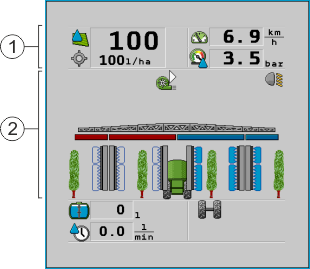


You can read about the information that appears in these areas in the following sections.
Function icons appear beside the work screen, which perform functions when they are tapped. Their position and operation depend on the type of ISOBUS terminal.
In the table below, you can see the meaning of the function icons on the work screen.


 /
/

Further information