


Button assignment for AUX operating devices
The terminal offers you the possibility of assigning the functions of an ISOBUS job computer to the buttons of the joystick. To do so, the ISOBUS job computer and the joystick must fulfil the Auxiliary 2 specification requirements from the ISOBUS standard.
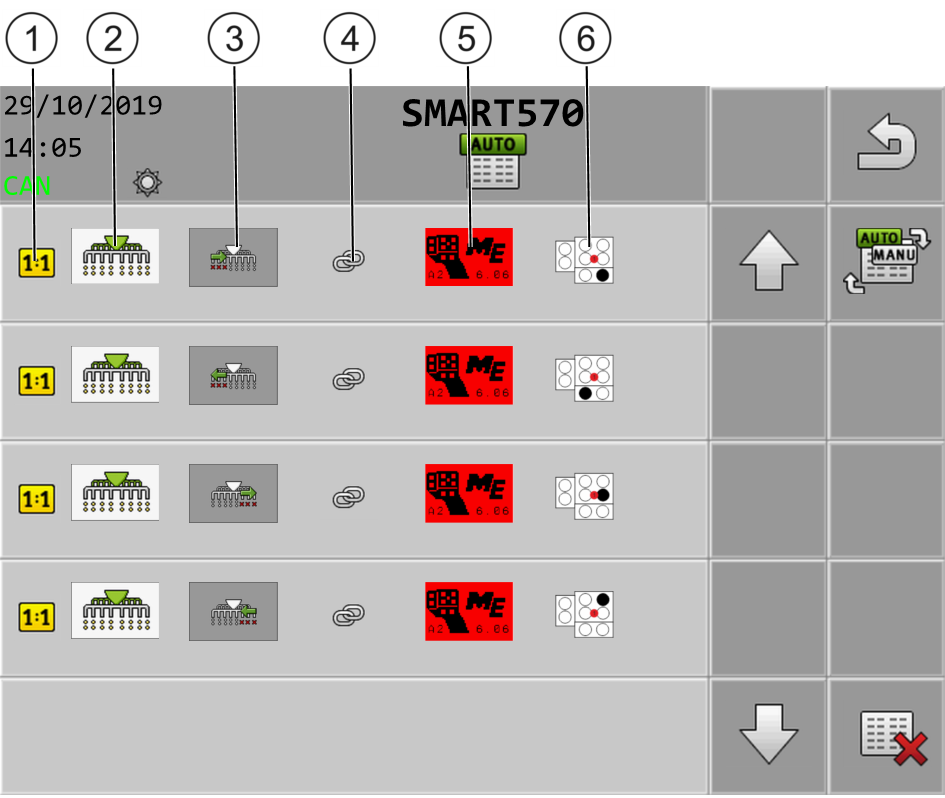
The configuration screen for the button assignment is structured as follows:


Procedure
- þ
- The joystick and ISOBUS job computer are connected.

- 2.
 - Select whether you want to make the assignments directly by pressing the buttons on the joystick or through the terminal.
- ⇨
- In the upper area of the screen, you can see the assignment mode:
 - Assignment is performed directly by pressing the buttons on the joystick.
 - Assignment is performed through the terminal.
 - Optionally, you can delete all of the current button assignments.
 .
- 5.
- If the function has not yet been assigned to a button, select the joystick to which you want to assign the function, for example:
 .
- 6.
- Press on the current button assignment, for example:
 . If there is no button assignment yet for the function, press:
 .
 .
- 8.
- Repeat this procedure for all desired assignments.
 - Exit the screen to save the assignments.
- ⇨
- You have completed the assignments and can now operate the machine with the joystick.