Icons on the implement image
General icons
| |
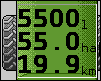
| Tank counter: - ▪
- Current fill level (l)
- ▪
- Area that can be sprayed until the tank is empty (ha)
- ▪
- Distance that can be driven until the tank is empty (km)
- ▪
- Acid content in the tank (pH)
|
| Ring line circulation function switched on. |
Boom
| |
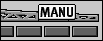
| DISTANCE-Control is installed but is deactivated. The boom has to be controlled manually. |
| |
TRAIL-Control
| | |
| | |
TRAIL-Control is installed but is deactivated. | | |
TRAIL-Control is in manual mode. | | |
TRAIL-Control is in automatic mode. | | |
The drawbar is locked with a pin | | |
The implement is being steered to the left. | | |
The implement is being steered to the right. | | |